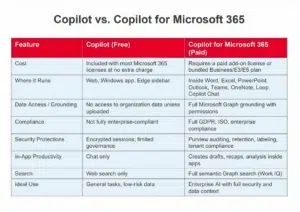


Anyone who uses Microsoft 365 knows that Copilot, Microsoft’s AI assistant, shows up everywhere. But here’s where things get confusing for many organizations – there are actually two different Copilots available inside a Microsoft 365 environment:
- Copilot (included at no extra cost)
- Copilot for Microsoft 365 (the paid, fully integrated version)
As usual, Microsoft’s naming convention leaves a lot to be desired (why not call the paid version Copilot Premium, for example?), but that’s not the point.
While both versions carry Microsoft’s enterprise data‑protection promises, the security implications and data access boundaries between the two are significant. Below, we break down the differences in plain English so business leaders can make informed decisions about when the paid version is worth it.
What You Get with the Free Copilot
The free version of Copilot – just called “Copilot” – is a web/Windows/Edge AI chat experience. It’s included with most Microsoft 365 Business and Enterprise licenses and is accessible through copilot.microsoft.com, The Windows Copilot app and the Edge browser sidebar.
What it can do:
- Research and general Q\&A
- Writing and rewriting
- Summaries
- Image generation
- Discuss files you manually upload
What it cannot do:
- Access your organization’s Microsoft 365 data (emails, documents, Teams chats, meetings, SharePoint, etc.)
- Work inside Word, Excel, PowerPoint, Outlook or Teams
When it comes to security, even the free version benefits from Microsoft’s commercial data protections:
- Prompts and responses are not used to train Microsoft’s foundation models
- Sessions remain encrypted
- Tenant isolation applies
- It’s designed for safe business use, but without access to tenant data
However, it is important to note the free Copilot is not fully compliant with enterprise security and regulatory requirements such as GDPR or ISO the way the paid version is.
In short, the free Copilot is secure for general use but cannot operate on or inside your corporate data, which inherently limits both productivity and security governance.
What You Get with Copilot for Microsoft 365 (Paid, typically $30/month)
The paid version, Copilot for Microsoft 365, is where Copilot becomes a true enterprise‑grade productivity tool.
What it can do that the free version cannot:
- Work directly inside Word, Excel, PowerPoint, Outlook, Teams, OneNote and Loop
- Summarize emails in Outlook
- Generate meeting recaps in Teams
- Draft documents using your historical content
- Analyze Excel files
- Search your tenant’s data using Work IQ (semantic Microsoft Graph search)
- Reason over SharePoint, OneDrive, Teams, emails, chats and calendars based on your existing permissions
Moreover, the paid Copilot is fully compliant with GDPR, ISO/IEC 27018 and EU Data Boundary.
On a granular level within your organization, it also adheres to Microsoft Graph–based access control, meaning:
- It only accesses data a user already has permission to see
- It enforces existing sensitivity labels, retention policies and DLP rules
- It prevents oversharing by respecting role‑based access controls
Your internal files confirm that Copilot for Microsoft 365 inherits:
- Sensitivity labels
- Audit logs
- Retention rules
- Data classification
Paid Copilot activities are also logged in Microsoft Purview, are governed and reviewable, and are protected via conditional access, insider‑risk monitoring and more.
The free version has none of this.
Perhaps most importantly of all, there’s no training on your data; prompts, responses and Graph data are never used to train public foundation models.
Want Help Deciding Which Is Right for Your Company?
At KaufmanIT, we’ve increasingly found ourselves holding informal Copilot training sessions for clients (which may become more formal soon). We also help organizations evaluate whether the free Copilot is sufficient – or whether the productivity and security benefits of Copilot for Microsoft 365 justify the investment.