


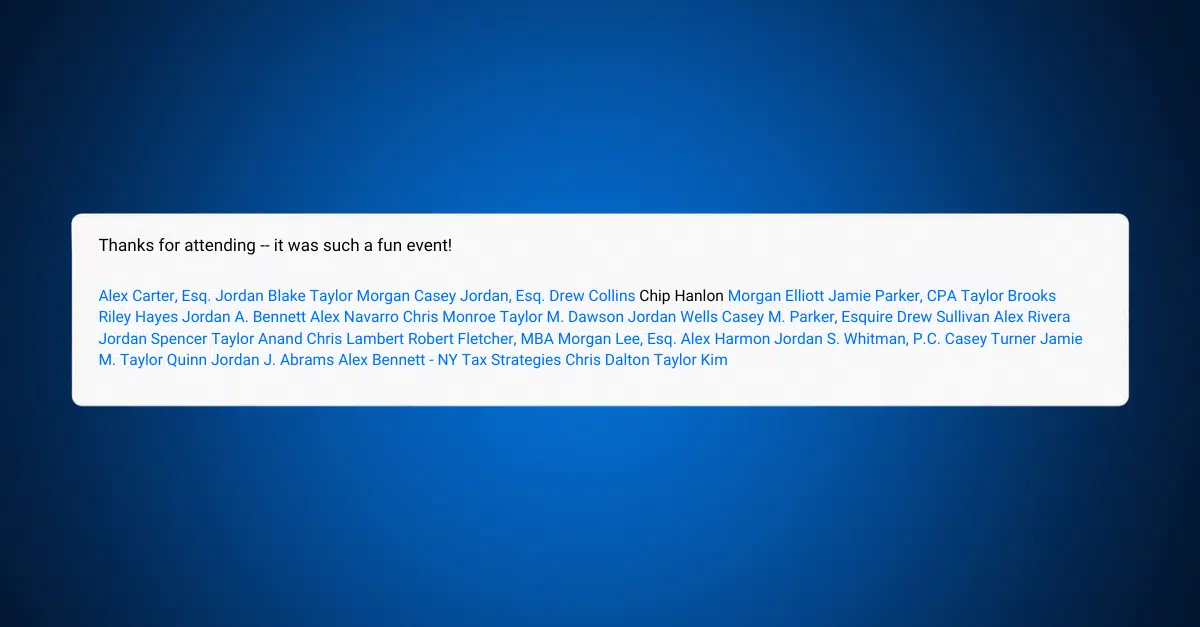
When LinkedIn tagging is done right, it’s powerful: it brings the right people into a conversation, recognizes collaboration and expands reach. Done poorly, it feels like a desperate grab for attention or worse – it hijacks your professional brand.
If you’ve ever been caught in a tag storm from a well-meaning but overzealous networking contact, you can manage the situation without torpedoing relationships.
First: What LinkedIn Actually Allows
Before diving into etiquette, it helps to understand how the platform works.
LinkedIn gives you a global control over tagging:
- You can allow tagging from everyone
- Or turn it off entirely so no one can tag you
What it does not allow:
- There is no “only these people can tag me”
- There is no “everyone except this one person”
In other words, it’s an all-or-nothing switch.
The Real-World Playbook (In Order of Professional Grace)
I’m writing this post primarily to show you how to remove yourself quietly from one overzealous post (Option 1). However, the rest of the following list provides all the options at your disposal for handling over-tagging like a pro.
1) Remove the Tag from a Single Post
Best for: occasional misuse or low-friction situations
If someone tags you in something irrelevant:
- Remove yourself from the post
- Your name stays visible as text, but no longer links to your profile
No notification is sent so it’s a clean, silent fix.
👉 Here’s how to do it:
Only if you’re tagged in someone else’s post will you see the “Remove mention” option in the three-dot dropdown menu at the top of the post:
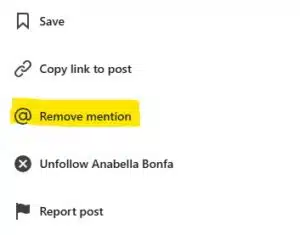
Simply click that option, and voila! Your name turns black (see featured image in this blog post) and the link is broken. As a bonus: the incessant notifications about that particular post, which result from having been at-mentioned, stop.
2) Send a Direct, Professional Nudge
Best for: repeat offenders you still want to maintain a relationship with
Most people don’t realize they’re overdoing it. A quick message can go a long way:
“Hey — appreciate the mentions. I’ve been trying to keep my tags focused on projects I’m directly involved in. Mind being a bit more selective when tagging me?”
This does three things:
- Sets a boundary
- Maintains the relationship
- Positions you as thoughtful, not reactive
In most networking circles, this is the sweet spot.
3) Disconnect
Best for: creating distance without confrontation, as the other party is not notified.
Removing a connection:
- Reduces your visible relationship
- But does not reliably prevent tagging
Depending on visibility and profile access, someone may still be able to find and tag you because LinkedIn’s tagging isn’t strictly limited to first-degree connections.
This is a social move, not a technical solution.
4) Turn Off Tagging Completely
Best for: high-volume annoyance across multiple people
You can disable tagging entirely:
- No one can tag or mention you moving forward
Downside:
- You’ll miss legitimate tags from clients, events and partners
- It can reduce your organic visibility
I like this option the least – why penalize yourself for someone else’s LinkedIn spam?
5) Block (The Nuclear Option)
Best for: spam, abuse or someone who won’t take the hint
Blocking a user means they:
- Can’t see your profile
- Can’t message you
- Can’t tag you
This is the only way to truly stop a specific individual. Hopefully, you won’t feel you need it.
What Good Tagging Etiquette Looks Like
Whether you’re tagging others or setting boundaries, a few simple rules go a long way:
- Only tag people directly involved in the content. Great tagging isn’t primarily about drawing more people to your post; it’s about bringing attention to others you think deserve it.
- Keep it sparse: mass-tagging 30 people at the end of a post just to boost reach is widely viewed as spammy and annoying. A few highly relevant tags is the norm. Some LinkedIn adjacent guidance even suggests staying around 3-5 tags max when possible.
- Respect a lack of engagement as a signal: not everyone wants to participate.
- Give context for the tag: don’t just dump names at the bottom. Make the mention feel natural:
Good:
“Learned a lot from @Jane Smith’s framework on pricing — curious if she sees the same trend.”
Weak:
“Thoughts? @Jane @Mike @Sarah @Tom @Lisa @David @Rachel @Chris @Amanda @Ben”
Good tagging adds value. Bad tagging is spam with a business card.
Final Take
LinkedIn is a networking platform, not a notification machine.
You don’t need to accept every tag and you don’t need to overcorrect by shutting everything down. The best operators treat tagging like introductions at a live event: thoughtful, relevant and intentional.
If someone keeps dragging you into conversations you didn’t ask for, you have a spectrum of options – from quiet fixes to outright disengagement.